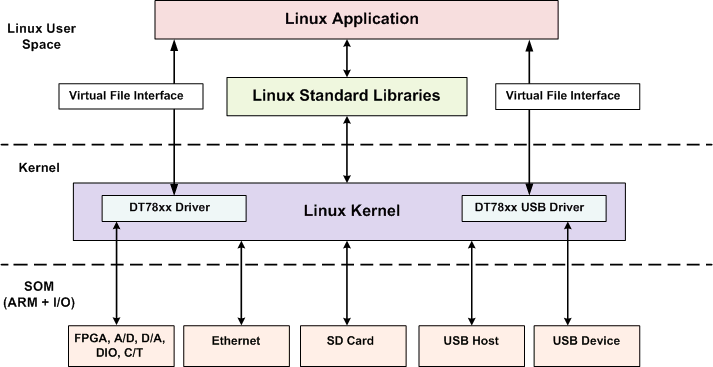
The DT7816 runs Linux 3.12 (Debian distribution) with custom loadable kernel modules (LKM) or device drivers.
The DT7816 device drivers and numerous example application programs reside on the DT7816 module. The drivers are loaded when the DT7816 module is powered up. The example programs demonstrate the functionality of the hardware and how to use file I/O commands to write application programs for the module. A calibration example is also provided for calibrating the analog circuitry of the DT7816 module. Refer to the DT7816 User's Manual for more information on using the calibration example.
The device drivers (DT78xx driver and DT78xx USB driver), shown in the
block diagram below, expose the functionality of the module to Linux user
space applications using virtual file interfaces.
The DT7816 module uses the following virtual files to access its subsystems:
/dev/dt7816-ain – Analog input subsystem.
/dev/dt7816-aout – Analog output subsystem.
/dev/dt7816-din – Digital input subsystem.
/dev/dt7816-dout – Digital output subsystem.
/dev/dt7816-tach – Tachometer input subsystem.
/dev/dt7816-measure – Measure counter subsystem.
/dev/dt7816-ctr-tmr – Counter/timer subsystem.
/dev/dt7816-stream-in – Input stream.
/dev/dt7816-stream-out– Output stream.
The USB device functionality of the DT7816 is accessible to user-space embedded applications using the following files:
/dev/dt7816-ep1in - EP1 IN endpoint.
/dev/dt7816-ep1out - EP1 OUT endpoint.
/dev/dt7816-ep2in - EP2 IN endpoint.
/dev/dt7816-ep2out - EP2 OUT endpoint.
/dev/dt7816-ep3out - EP3 OUT endpoint.
/dev/dt7816-ep4out - EP4 OUT endpoint.
/dev/dt7816-ep5out - EP5 OUT endpoint.
User applications can perform standard file operations such as open, close, read, and write on the virtual files to access and control the hardware or to send data to the USB host through an IN endpoint and receive data from the USB host through an OUT endpoint. For instance, to access the digital input subsystem on the DT7816 module, the application uses the virtual file handle for the digital input subsystem (/dev/dt7816-din) as follows.
Open the file /dev/dt7816-din, thereby allowing access to the digital input subsystem.
If supported, configure parameters for the digital input subsystem using IOCTL commands.
Read from the file, which in turn, reads the value of the digital input port and returns a value.
Close the file.
Refer to the DT7816 File I/O Programming Manual for more information about writing application programs for the DT7816 module using virtual files and file I/O commands.