Updating the FPGA of the DT7816
Occasionally, Data Translation may have updates to the FPGA EEPROM that
is on the DT7816 module.
To update the FPGA of your DT7816, you will need the following:
A micro SD card capable of storing a minimum
of 1 GB of data. If your host computer does not have a built-in SD
card reader, you will need a USB SD card reader.
A Linux host computer, or a Windows host
computer running a program such as Win 32 Disk
Imager.
Note that this procedure will not affect any user
applications or calibration settings on the module.
Perform the following steps to update the FGPA of the DT7816 module:
From the Software
Download tab of the DT7816 page on our website,
download the latest FPGA/NAND image file (dt7816_x.x_sdcard.img,
where x.x represents the
version of the file) to a local directory on your host computer.
This file is currently 300 MB in
size.
Insert the micro SD card into the card reader,
and plug the card reader into the host computer.
If you are using a Windows host computer,
run the Win32 Disk Imager program, select
the file that you downloaded in step 1 as the image file, select the
SD card as the device, and click
Write to copy the file to the SD card. Then, proceed to step
6.
If you are using a Linux host computer,
list the block devices using one of the following commands to see
where the SD card is located:
# lsblk
or
# sudo fdisk -
l
Assuming that the SD card is found in the
directory /dev/sdb, copy the
downloaded image to the SD card using the following command, where
x.x represents the version
of the file:
# sudo dd if=dt7816_x.x_sdcard.img
of=/dev/sdb bs=4M
Note that you may have
to unmount the SD card before performing this step.
Once the file is copied (the Linux prompt
is displayed), remove the SD card from the host computer and insert
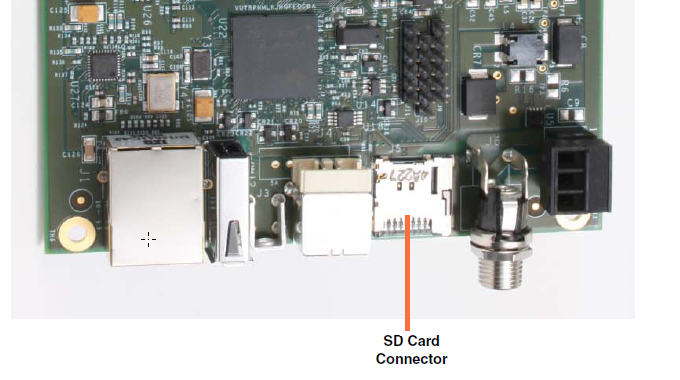
it into the SD card connector of the DT7816 module, shown below:
Power cycle (unplug/plug in the power cable)
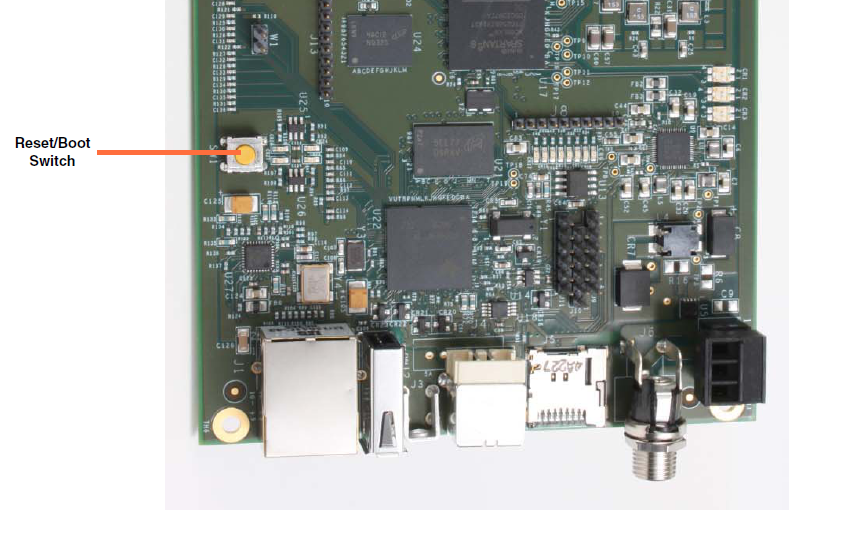
of the DT7816 module or press the reset switch on the module, shown
below:
As the DT7816 starts to boot up, press the
Enter key to abort the boot
sequence.
The U-Boot prompt is displayed.
At the U-Boot prompt, enter the command
dt78xx_init to update the
FPGA:
# dt78xx_init
Erase and program FPGA eeprom? <Y/N>
At the prompt Erase
and program FPGA eeprom? <Y/N>, enter Y:
Erase and program
FPGA eeprom? <Y/N>
# Y
Erase and program NAND flash? <Y/N>
At the prompt Erase
and program NAND flash? <Y/N>, enter N:
Erase and program
NAND flash? <Y/N>
# N
When the Linux command prompt reappears,
remove the SD card and power cycle the DT7816 or press the reset switch
on the DT7816 module to reboot the module with the updated FPGA.