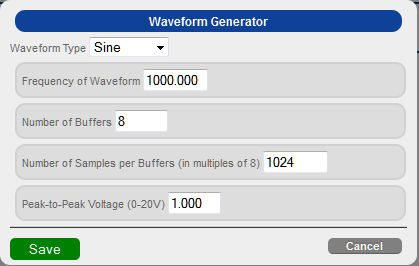
From the Output Stream page
of the DT7837 web server, click Generate
to configure the waveform generator settings.
The following options appear:
Configure the waveform generator settings by performing the following steps:
For Waveform Type, select one of the following waveform patterns to output:
Sine – A sinusoidal, periodic waveform.
Square – A non-sinusoidal waveform that is shaped like a square, alternating between two levels. (Note that due to the nature of Sigma-Delta converters used on the supported data acquisition devices, you may see variations of the signal at each level.)
Sawtooth – A non-sinusoidal waveform that ramps up and then drops sharply. This is sometimes called a ramp waveform.
Triangle – A non-sinusoidal waveform that is shaped like a triangle.
By default, a sine wave is output.
For Frequency of Waveform, enter the frequency, in Hertz, of the waveform to output. By default, a frequency of 1000 Hz is used.
For Number of Buffers, enter the number of buffers to use. By default, 8 buffers are used.
For Number of Samples per Buffer, enter the number of samples to output in each buffer. By default, 1024 samples are used.
For Peak-to-Peak Voltage, enter the voltage of the waveform to output measured from the top to the bottom of the waveform. Values range from 0 to 20 V. By default, a peak-to-peak voltage of 1 is used.
Click Save to save the configuration.