Reads digital I/O channel data from a binary file, and stores the values in an array.
C/C++
int cbLogReadDIOChannels(char* Filename, int StartSample, int Count, int* DIOChannels)
Visual Basic
Function cbLogReadDIOChannels(ByVal Filename$, ByVal StartSample&, ByVal SampleCount&, ByRef DIOChannelData&) As Long
FileName
The name of the file to retrieve the information from.
StartSample
The first sample to read from the binary file.
Count
The number of samples to read from the binary file.
DIOChannels
Receives the DIO input values.
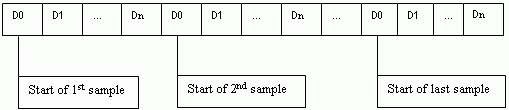
The user is responsible for allocating the size of the DIO array, and ensuring that it is large enough to hold the data that will be returned. You can calculate the array allocation using the SampleCount value from cbLogGetSampleInfo() and the DIOCount value from cbLogGetDIOInfo():
int* DIOChannels = new int[SampleCount * DIOCount];
The figure below shows the layout of the DIO array, and how the elements should be indexed.
Where n is (DIOCount - 1)
Use the following code fragment to access the elements of the DIO array:
for (i=0; i<numberOfSamples; i++)
{
for (j=0; j<numberOfDIOChannels; j++)
{
d = dioArray[(i * numberOfDIOChannels) + j];
}
}
where
the numberOfSamples is set by the SampleCount value from cbLogGetSampleInfo()
the numberOfDIOChannels is set by the DIOCount value from cbLogGetDIOInfo()