 »Logging Options.
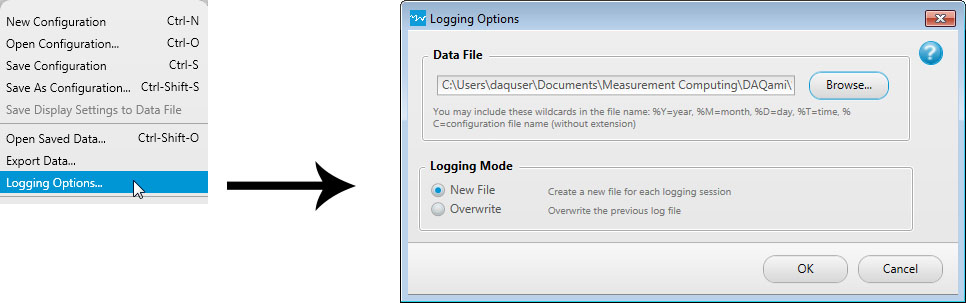
Logged data is saved based on the settings on the Logging Options dialog box. To open this dialog box, select »Logging Options.
The timestamp applies to the first channel in the acquisition.
| Logging Options Dialog Box | |
| Data File | The name and location with which to save the data file. Data files are saved by default to ..\My Documents\Measurement Computing\DAQami\%y%m%d_%t.tdms. Click Browse and specify a different name and/or location if desired. |
| Include the wildcards %Y, %M, %D, and %T in the filename to list the year, month, day, and time, respectively, when the data was acquired. You can also use the wildcard %C to include the name of the configuration file in the data file name. | |
| Using the default settings, a file logged on August 7, 2015 at 9:18 AM is saved with the name 20150807_0918.tdms. | |
| Logging Mode | Select the logging mode from the following option buttons:
|