You can use non-retriggerable one-shot mode to generate a single output pulse from the counter whenever the specified edge is detected on the counter’s gate signal (after the pulse period from the previous output pulse expires). Any gate signals that occur while the pulse is being output are not detected by the module. The module continues to output a single pulse when the specified gate edge is detected until you stop the operation.
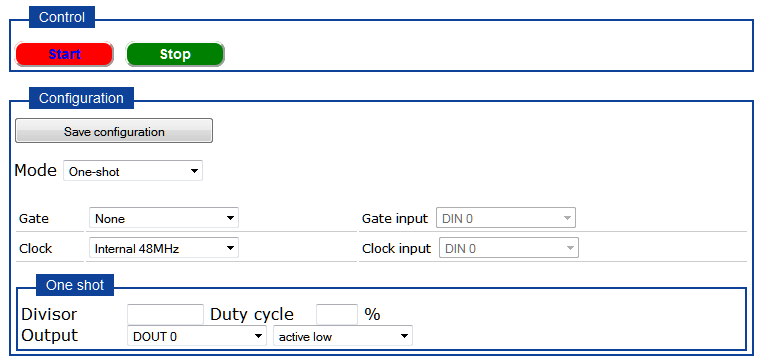
When you choose One-shot mode from the Counter/Timer page of the web server, the following options are available:
To perform a rate generation operation, perform the following steps:
For Mode, select One-shot.
For Gate, select one of the following:
None - The operation is enabled immediately when you start the operation. (No general-purpose input signal is required for the gate input when a software gate is used.
External hi - The operation is enabled when the counter’s gate signal goes from a low to a high transition and is disabled when the counter’s gate signal goes from a high to a low transition.
If you select this gate type, specify which general-purpose input pin of the Digital I/O header to use for the gate input signal to the counter using the Gate input drop-down box, and ensure that you wire the gate input signal to this pin.
External lo - The operation is enabled when the counter's gate signal goes from a high to a low transition and is disabled when the counter’s gate signal goes from a low to a high transition.
If you select this gate type, specify which general-purpose input pin of the Digital I/O header to use for the gate input signal to the counter using the Gate input drop-down box, and ensure that you wire the gate input signal to this pin.
For Clock, select either the Internal 48 MHz clock or External if you connected an external clock input to the counter. An internal clock source is typically more useful for one-shot applications. Note that you can output pulses using a maximum frequency of 24 MHz (if using the internal C/T clock) or 5 MHz (if using the external C/T clock).
If you select External, specify which general-purpose input pin of the Digital I/O header to use for the clock input signal to the counter using the Clock input drop-down box, and ensure that you wire the gate input signal to this pin.
For the Divisor, enter the number of input clock cycles that are used to create one period of the counter clock output signal, and then specify the duty cycle (the number of input clock cycles used to create the active pulse width) in percentage.
For example, if you are using an external C/T clock running at 10000 Hz as the input clock source of the counter/timer, and you want to generate a output signal of 1000 Hz with a 20% duty cycle, specify a divisor of 10 (10000 Hz divided by 10 is 1000 Hz) and a pulse width of 20%.
For the Output, specify the which general-purpose output pin of the Digital I/O header to use for the counter clock output signal, and ensure that you wire the counter clock output signal to this pin.
Then, specify the polarity of the output signal as active high or active low. For an active high pulse, the high portion of the total pulse output period is the active portion of the counter/timer pulse output signal. For an active low pulse, the low portion of the total pulse output period is the active portion of the counter/timer pulse output signal.
Click Save configuration.
Ensure that you wire signals appropriately for a one-shot operation.
Click Start to start
the operation.
If you selected a software
gate (none), a single pulse is output immediately. If you selected
an external hi or external lo gate, a single pulse is output whenever
the specified gate is active.
When you are finished with the operation, click Stop.
Refer to the DT7816 User's Manual for more information on non-retriggerable one-shot operations.